
Glass Widgets
AppsLab Co.Personalization
4.5402.00 Reviews
- Version
- 1.3
- Installs
- 100.00K
- Age Rating
- Everyone
Screenshots
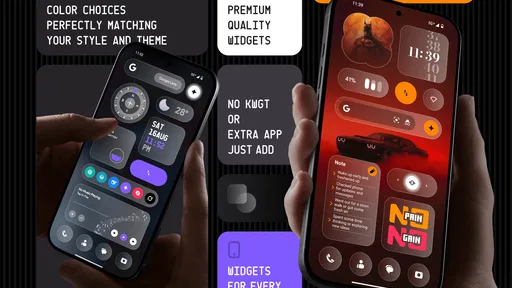
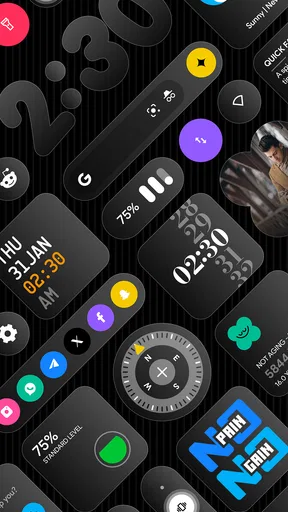
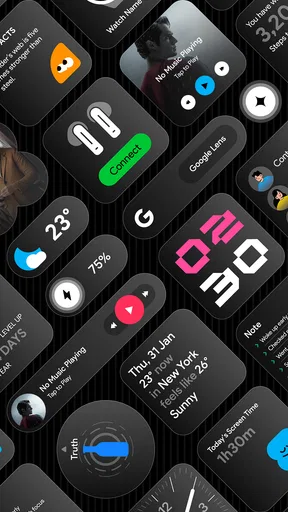
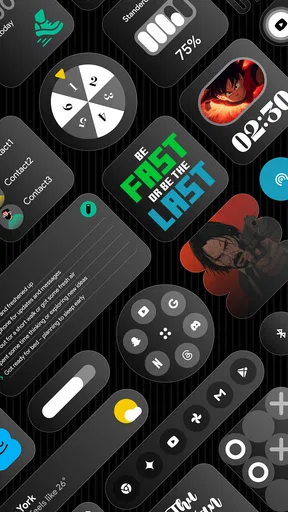
Our Review of Glass Widgets
 Analysis by Appyee
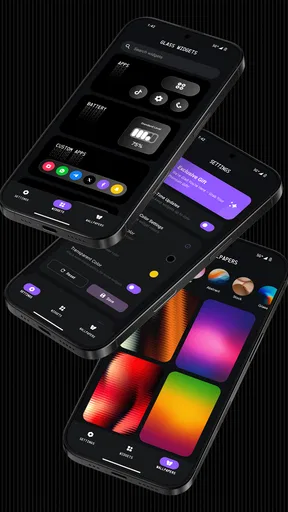
I judge a personalization app by more than how polished its screenshots look. I want to know whether the screen stays legible, whether arranging things is manageable, and whether the design helps in everyday use rather than turning the phone into a display project. Glass Widgets is built around translucent, glass-like styling, and that makes it most appealing to people who enjoy shaping their home screen around a particular wallpaper or visual mood.
Readability comes down to the wallpaper
The central trade-off is right there in the transparent look: it can make a screen feel open, but the text and details sit against whatever image is underneath. A quiet wallpaper gives the widgets room to breathe; a busy photo can make information harder to pick out. I’d choose the background and widget together, rather than finishing the layout first and hoping every element remains clear.
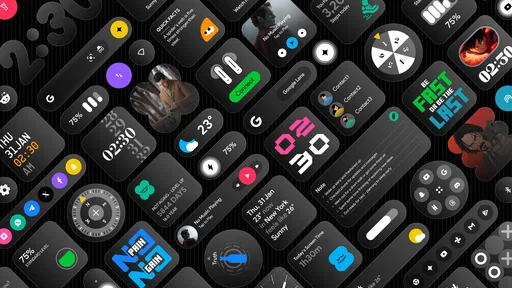
The app’s range is part of its appeal. It offers more than 350 widgets, with options intended for both home and lock screens, so there is room to build a consistent look without relying on one repeated tile. That breadth can also make browsing feel like a design task. I’d start with one useful item—such as a clock or calendar—then add others only when they make the screen easier to use.
Touch, contrast, and different ways of using a phone
Glass styling is a visual choice, not an accessibility guarantee. People who need strong contrast, larger-looking text, or a particularly clear separation between foreground and background should inspect the result on their own device before settling on a layout. A translucent panel that looks elegant in one setting may be difficult to read in bright light or over a detailed image.
There is a useful way to approach customization here: treat legibility as the first setting, and decoration as the second. Keep the wallpaper relatively calm behind the information you check most, and avoid filling every available space just because the catalog offers many choices. For someone who relies on quick glances, a small number of readable widgets is likely more helpful than a dense arrangement of attractive ones.
Motor needs matter too. Choosing and arranging widgets involves interacting with the phone’s regular home-screen controls, so the experience may be less comfortable for someone who finds precise tapping or drag-and-drop gestures difficult. I would test a simple layout first and keep changes limited to one area at a time. That makes it easier to tell whether the setup is genuinely convenient rather than merely satisfying to customize.
Where it fits—and where it may not
Glass Widgets is a personalization app from AppsLab Co. The current version is 1.3, it runs on Android 12 or later, and its content rating is Everyone. It costs $0.99, with in-app purchases ranging from $1.99 to $9.49 per item. Those costs are worth considering if you expect to explore premium customization: I’d decide how much of the visual style I actually want before paying for extras.
Its average rating is 4.5 from around 4,900 ratings, with 334 written reviews and over 100,000 installs. Those figures suggest it has found an audience, but they cannot tell you whether its particular glass effect will work with your wallpaper, eyesight, or daily habits. A quick personal trial of the layout is more useful than treating popularity as a promise.
Compared with building a screen from a launcher’s own basic widgets, this app is aimed more squarely at a coordinated translucent appearance. That focus is helpful if you care about matching the screen’s visual details. If you mainly want the clearest possible calendar, clock, or reminders, the standard widgets already on your phone may be simpler and easier to evaluate for readability.
For a low-friction everyday setup, I’d put a clock where it is easy to glance at and keep the calendar near the part of the screen I naturally reach. Before adding more, I’d check both in the lighting where I usually use my phone. If a widget disappears into the wallpaper, changing the background may solve the problem more cleanly than adding extra decoration or repeatedly adjusting the layout.
Transforming Your Home Screen
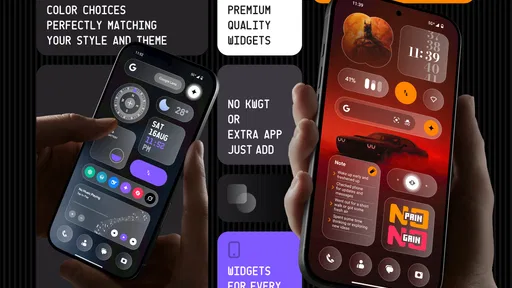
So, what’s the deal with Glass Widgets? Well, it’s all about bringing a clean, minimalist vibe to your home screen. The app offers a suite of transparent widgets that blend seamlessly with any wallpaper you throw at them. Whether you’re into the whole aesthetic game or just want a clutter-free look, these widgets got you covered.
One of the first things that struck me was the customization options. You can tweak the transparency levels, colors, and fonts to match your personal style. And trust me, it feels like having a mini design studio right at your fingertips. I found myself spending way more time than I’d like to admit, just fiddling with the settings.
Features That Stand Out
Let’s dive into some of the features that make this app a keeper. First up, the clock and weather widget. Simple, yet effective. It gives off a sleek, professional look, and the best part? It doesn’t hog your battery life. That's a win!
There’s also the calendar widget, which integrates smoothly with your existing calendar apps. You get a quick glimpse of your upcoming appointments right from the home screen. I mean, who doesn’t love a little productivity boost?
And for the news junkies out there, the news feed widget lets you keep up with headlines without diving into a full-fledged news app. It’s like having snippets of information gently nudging you every time you unlock your phone. Pretty neat, right?
User Experience
Installing and setting up Glass Widgets is a breeze. The app guides you through the initial setup with easy-to-follow instructions. Even if you’re a newbie, you’ll have widgets up and running in no time.
Performance-wise, the app runs smoothly. I didn’t experience any lags or crashes, which is always a plus. The widgets update in real-time, and the transitions are as smooth as butter. It’s the kind of stuff that makes you appreciate good app design.
However, nothing’s perfect, right? While the app is free, some of the more advanced features are locked behind a paywall. It’s a small price to pay if you’re into heavy customization, but it’s something to keep in mind.
Why You Might Love It
If minimalism is your jam, Glass Widgets is your go-to. It strips away the unnecessary clutter and brings a touch of elegance to your home screen. Plus, the level of customization is perfect for those who love personalizing their devices.
The app’s lightweight design ensures that it doesn’t slow down your device, and its compatibility with a wide range of Android devices is the cherry on top. It’s like having a personal assistant that quietly enhances your phone’s aesthetics without demanding too much attention.
So, if you’re ready to give your home screen a facelift without diving into the complex world of launcher apps, give Glass Widgets a whirl. It might just be the tweak you didn’t know you needed.
In conclusion, Glass Widgets offers a blend of simplicity, functionality, and style. It’s perfect for anyone who wants a sleek, modern look without compromising on performance. So, go ahead, download it, and let your home screen shine!
Small adjustments that make a layout easier to live with
A practical way to explore the catalog is to make one change, use the phone normally, and only then decide what to add next. For example, I’d set up a clock first, try it during a quick morning glance, and see whether the time is immediately readable. Then I’d add a calendar only if seeing appointments on the home screen saves me a separate step. This keeps customization tied to a real need instead of turning into endless rearranging.
There’s also a useful distinction between a widget that looks transparent and one that remains visually quiet. If a busy wallpaper competes with the text, lowering visual clutter elsewhere may help more than making every widget translucent. A plain or softly colored background behind the information can preserve the glass effect while giving important details a clearer place to sit. The best result may be less dramatic than a full-screen collage, but it is often easier to scan.
A routine, not just a makeover
Imagine checking the phone while getting ready to leave. A clock and a glance at the day’s calendar can be useful when there is no time to open several apps. In that moment, the value of the design depends on speed: can I recognize the information without stopping to decode it? I’d prioritize the details I check under pressure and leave decorative widgets for a screen I browse when I have time.
This also points to who is most likely to enjoy the app. It suits someone who likes a coordinated home screen, is comfortable adjusting fonts and colors, and wants a visual theme that can extend beyond a single clock. It is less compelling for someone who rarely looks at widgets, prefers default layouts, or wants a purely functional screen with maximum contrast and no time spent tuning appearance.
For a household phone or a device shared with someone who has different visual preferences, I’d avoid assuming one carefully styled layout will suit everyone. A design that feels calm to me might be too faint for another person, especially when the phone is used outdoors or at a quick angle. Check the screen in the actual places it is used, and be willing to choose a simpler background or a standard widget if that makes the key information easier to see.
Cost, choice, and the point to stop customizing
The app was released on August 22, 2025, and its rating is Everyone. The initial $0.99 price is modest, but the additional purchases mean I would not treat every customization option as part of one all-inclusive purchase. I’d first see whether the included selection gives me a layout I want to keep. If the look I’m after depends on paid items, I’d compare that extra spend with the value I place on a coordinated screen.
Because the catalog is broad, more choice does not automatically mean a better result. I find it helps to decide on a small visual rule before browsing: perhaps one font style, a restrained color, and just the widgets I consult every day. That prevents a polished clock, calendar, and news panel from each competing for attention. It also makes it easier to spot whether the glass finish is improving the screen or simply adding another layer to manage.
One question many people have is whether this replaces their existing apps. I’d think of the widgets as a glanceable presentation, not a reason to abandon the apps behind the information. A calendar tile can help surface the day’s plans, while the calendar app remains the place to manage them. Likewise, a news widget can help me notice headlines, but it is not a substitute for reading a full article when context matters.
My inclusive verdict
I see Glass Widgets as a design-led choice with practical uses, rather than a universal improvement to every phone screen. Its adjustable appearance gives people room to make a personal layout, but transparency can also introduce a readability trade-off that matters more than the finish itself. I would recommend it to someone who enjoys visual customization and is willing to test contrast, spacing, and placement on their own device.
If clear, high-contrast information is the priority, or if adjusting a layout is tiring, the default widgets may be the better starting point. If the glass style appeals to you, begin with one or two essential items, check them in both bright and dim surroundings, and keep only what makes daily checks easier. That approach lets the app’s distinctive look work for you without asking you to sacrifice comfort for appearance.
Verdict
Strengths of Glass Widgets
- Highly customizable widget options.
- Smooth and responsive interface.
- Minimalistic design enhances user experience.
- Offers a variety of widget styles.
- Efficient battery usage.
Limitations of Glass Widgets
- Limited free version features.
- Occasional minor bugs.
- No in-app tutorial for beginners.
- Some features require purchase.
- Updates can be infrequent.
Other Releases by AppsLab Co.
View All
DepthX - Live Clock Wallpapers
Personalization4.1

NewThing Widgets Pro
Personalization4.5

Galaxy Widgets: One UI
Personalization4.4

DarkGlass Widgets
Personalization4.6
Similar Picks in This Category
View All
Microsoft SwiftKey AI Keyboard
SwiftKey4.3

Wallpapers
Google LLC4.1

Zedge™ Wallpapers & Ringtones
Zedge4.7

Yandex Browser with Alice AI
Direct Cursus Computer Systems Trading LLC4.3

Ringtone Maker:create ringtone
Big Bang Inc.4.7

Fonts Keyboard
Fonts Keyboard3.9
Frequently Asked Questions
What is Glass Widgets and how does it enhance my device?
Glass Widgets is an app that provides customizable widgets for your Android or iOS device. It enhances your phone by offering sleek, transparent widgets for calendars, clocks, weather updates, and more. These widgets integrate seamlessly with your home screen, providing easy access to essential information without cluttering your device's interface.
How user-friendly is Glass Widgets for customization?
Glass Widgets is designed with user-friendliness in mind, offering a straightforward interface for customization. You can easily adjust widget transparency, size, and layout to match your home screen aesthetics. The app provides drag-and-drop functionality and preview features, allowing you to see changes in real-time before applying them.
Does Glass Widgets affect my device’s battery life?
Glass Widgets is optimized to minimize battery consumption. While running any widget continuously can impact battery life to some extent, Glass Widgets uses efficient coding to ensure it remains lightweight. The impact on battery life is typically minimal, allowing you to enjoy the aesthetic and functional benefits without significant drain.
Is Glass Widgets compatible with all devices and operating systems?
Glass Widgets is compatible with most Android and iOS devices. However, it's always advisable to check the app's requirements on the download page for specific compatibility notes. Some older devices or operating system versions may experience limited functionality or performance issues due to hardware limitations.
What are the main features that set Glass Widgets apart from other widget apps?
Glass Widgets stands out with its unique transparency feature that blends seamlessly with any home screen background. It offers a range of customizable options, including different styles for time, date, and weather widgets. Additionally, its intuitive design and lightweight performance make it a preferred choice for users seeking both functionality and aesthetics.
